Review Comments (2) Screenshots (4) Questions & Answers (0) Votes (36) Awards (5) Wiki  
-Please log in to rate
4.6 4.6/5 (36)
-FJ Software
-1.7.4
-www.fjsoft.at
-Freeware
- 11 649 people
Download MyPhoneExplorer

3.66 MBDownloaded 2670 times


Review

MyPhoneExplorer is the phone manager that every Sony Ericsson mobile phone owner should have. MyPhoneExplorer can carry out several tasks such as keeping your contacts database, your task list and appointments synchronized.
Before using MyPhoneExplorer for the first time you should customize your settings and set up the connection between your computer and your mobile phone. This connection can be established through USB or wirelessly through bluetooth. Every sync option can be done with a different program, for example, I can sync my contact database with outlook and my calendar with google.
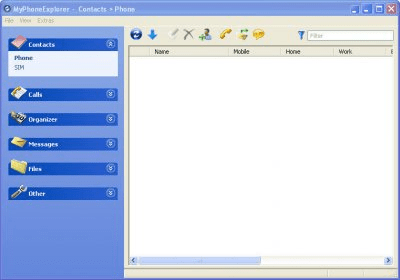
MyPhoneExplorer has several tabs which are: Contacts, calls, organizer, messages, files and other. In each of these you can manage different parts of you mobile phone.
In this version there has been a huge leap in Symbian phones compatibility, so now UIQ3-Phones will work adequately. But this is not the only improve in this version. It has been added the feature to access the notes on the phone, compatibility with sms chats, filter options has been added to file syn actions. One of the new features that I like the most is the ability to make backups of data when the phone is not connected, which would have been really useful when my last phone broke and I could use the old sync account with the new phone.
In conclusion: MyPhoneExplorer is a must for every Sony Ericsson user.
Advantages
  • It´s the best Sony Ericsson sync tool
  • Symbian compatibility enhancement
  • Several bugfixes
  • Freeware
Disadvantages
  • A bit tricky to set up for the first time

Reviewed by: Jorge Tierno Alvite

Reviewer rating: Editor's rating 5

Screenshots

Multi-sync Multi-sync Organizer Organizer Phone status Phone status Main Window Main Window

Latest comments

Hendrik(beginner) Last month 
I have been using it for years. It appears to be the most reliable software for synchronising. It handles possible conflicts logically and the synchronising with the Google Calendar is flawless. Also backing up and restoring the database is reliable, which is a relief when you change or reinstall your computer.
And most of all it's very small, really the opposite of what is sometimes called 'bloatware'.
William(beginner) 9 months ago 
Just tried successfully, to synchronize the calendar of my Sony Ericsson K700i, to the popular Google calendar. The steps quite complex actually, but it works!
First, install softwares: My Phone Explorer & Mozilla Sunbird.
Then, Sunbird subscribed to the particular Google Calendars, while My Phone Explorer being configured to synchronize the calendar with Sunbird.
At the end, both My Phone Explorer & Sunbird just act like the middle agent for the info calendar info exchange of my handphone and the Google Calendar on the web. (of course these 2 powerful software enable me to browse the backup contact and calendar while offline too!)
Add new comment All 2 comments
Tag cloud Extensions
.mpb File for MyPhoneExplorer
.sms File for MyPhoneExplorer
Download siClient

Email Address:

Password:

Register now »

Forgot password?

Copyright © 2009, Informer Technologies, Inc. About| Privacy and terms| Help| Feedback